


If you are an SMB marketer evaluating automation platforms, you have probably done what everyone does: opened a spreadsheet, listed the features each platform claims to offer, and tried to find the one with the most checkmarks. It feels thorough. It feels objective.
It is also how most teams end up locked into platforms that cost too much, do too little of what they actually need, or both.
Here is what a typical checklist looks like:
Feature | Platform A | Platform B |
Email campaigns | ✓ | ✓ |
SMS messaging | ✓ | ✓ |
Workflow automation | ✓ | ✓ |
A/B testing | ✓ | ✓ |
Integrations | 500+ | 150+ |
Both platforms check all the boxes. But the checklist tells you nothing about:
- Whether SMS is built into the platform or bolted on as a $200/month add-on
- Whether “workflow automation” means pre-built templates you can launch in an hour, or a complex engine that requires a specialist to configure
- Whether those 500 integrations include the three you actually need
- Whether the data infrastructure underneath can support the campaigns you want to run
A checklist is a parts list. It tells you what a platform claims to have. It tells you nothing about how those parts connect—or whether the platform is actually strong where you need it to be strong.
Why Feature-based Comparisons Are a Losing Game
When you evaluate platforms based on individual features, four things tend to happen:
- No pattern recognition: Platform A has 100 features, B has 200. How do you evaluate the two without grouping features into high-level capabilities?
- No dependency awareness: Marketing automation capabilities are not independent—they stack. A workflow engine is only as powerful as the data feeding it. A multi-channel outreach system is only as effective as the optimization layer refining its delivery. A feature-based evaluation treats “email,” “segmentation,” and “A/B testing” as separate line items. In reality, they are layers that depend on each other.
- You’re comparing for capabilities you’ll never use: A feature-based checklist invites you to compare everything. Platform A has better revenue attribution as it uses advanced probabilistic matching. Platform B excels at native integrations into ad severs. Platform C has none of this. Would you reject platform C even if your business model does not need anything more than basic last-touch attribution? Doing this due diligence for multiple features is wasted motion on a capability that won’t move your business.
- Same words, different meanings: Marketing automation vendors don’t share a glossary. “Automation” on one platform could mean pre-built integrations with third-party connectors, but where you still have to connect these manually. On another, automation could mean a full conditional logic engine: if/then branching, wait steps, multi-path journeys but with little support for external data pulls. Both platforms check the “automation” box. Which one do you pick?
A Better Lens: The Capability Map
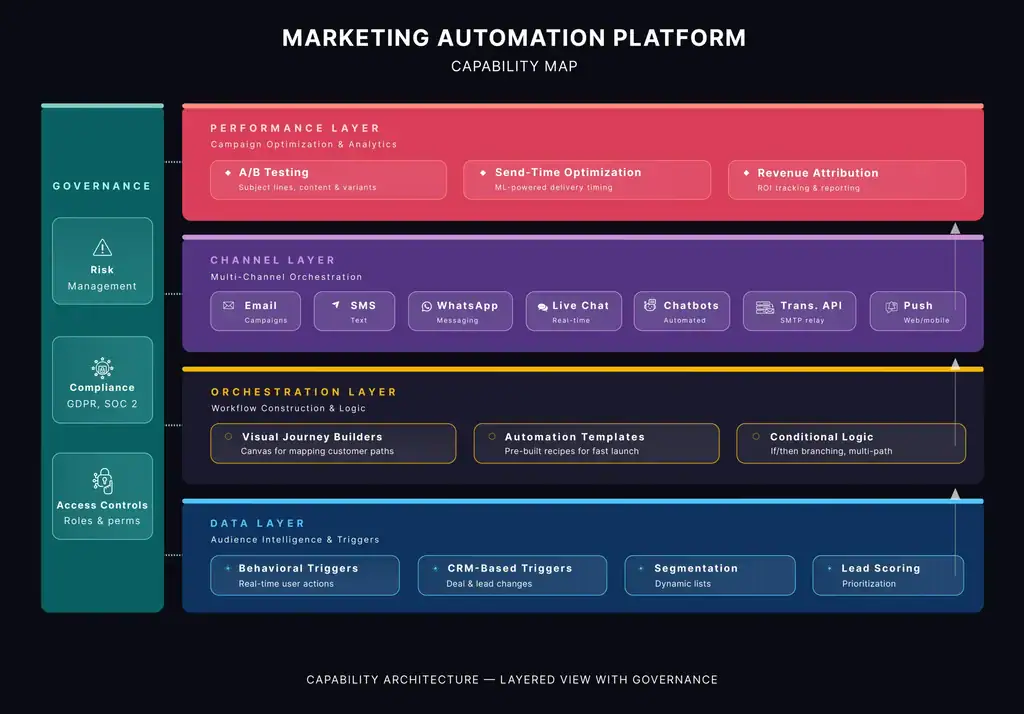
A Capability Map does away with all the problems of feature-based comparisons. It organizes every marketing automation platform capabilities into high-level groups organized as layers. Each layer has sub-capabilities and depends on the ones below it and enables the ones above. When you evaluate a platform this way, you are not asking “does it have SMS?”—you are asking “how does its channel layer connect to its data layer, and is the optimization layer above it strong enough to make those channels perform?” Here are the five layers, from the foundation up:
Data Layer
The Data Layer sits at the foundation: behavioral triggers, CRM sync, lead scoring, and dynamic segmentation. This is the intelligence that decides who enters a workflow and when.
Orchestration Layer
The Orchestration Layer is the engine: visual journey builders, automation templates, and conditional logic that route contacts through multi-path journeys.
Channel Layer
The Channel Layer handles execution: email, SMS, WhatsApp, chat, transactional APIs, and push notifications. This is how the message actually reaches the customer.
Performance Layer
The Performance Layer optimizes delivery: A/B testing, send-time optimization, and revenue attribution that tell you what’s working and what isn’t.
Governance Layer
This layer includes capabilities relating to operational control, data privacy, risk, compliance and other infosec requirements.
What This Changes
With the capability map, the marketing automation platform evaluation becomes strategic:
- You decide which layers matter for your business before you compare platforms.
- You stop weighting capabilities that sound impressive but won’t move your numbers.
- You expose vague vendor language —“automation” becomes “orchestration layer: does it have conditional logic, or just templates?”
- You compare apples to apples because every platform’s capabilities are mapped to the same structure.
The Framework in Action: Brevo vs. HubSpot
To see how the capability map changes the evaluation, consider two popular platforms: Brevo and HubSpot.
When Brevo makes sense: The SMB multi-channel case
An SMB running campaigns across email, SMS, and WhatsApp does not need advanced revenue attribution or 1,500 integrations. What they need is a strong Channel Layer (native multi-channel, not bolted-on add-ons), a capable Orchestration Layer (templates and workflows a non-technical marketer can operate), and a Data Layer with pricing that does not penalize them for a large contact list they email selectively. Brevo maps strongly to these requirements: native SMS and WhatsApp at no extra cost, unlimited contacts with volume-based pricing starting at $18/month, and pre-built automation templates that launch in minutes. For this profile, evaluating HubSpot’s depth in CRM-based lead scoring or board-ready analytics is wasted motion—those are Performance and Data Layer capabilities the business does not need yet.When HubSpot is the winner: The enterprise CRM-driven case
A mid-market or enterprise sales organization with complex lead qualification, multiple deal stages, and a need for predictive lead scoring is operating in a different part of the map. Their priority is a deep Data Layer (full CRM integration, behavioral scoring, contact enrichment) and a robust Performance Layer (revenue attribution, pipeline analytics, board-ready reporting). They may also have strict Governance requirements—audit trails, role-based access, SOC 2 compliance. HubSpot’s architecture is built for this profile. Brevo could technically support some of these workflows, but it would require significant custom development and third-party integrations—bespoke work that erodes the cost advantage and introduces integration risk. For this profile, HubSpot’s higher price point reflects genuine capability depth in the layers that matter.The Detailed Capability Map
The five-layer model is the lens. Underneath it sits a detailed evaluation framework capturing over 100 sub-capabilities across Data, Orchestration, Channels, Performance, and Governance.
It is designed to scale—whether you are a 10-person team evaluating your first platform, a mid-market company replacing a legacy system, or an enterprise running a formal RFP process.
You do not need all 100. The framework lets you select the capabilities that match your business model, ignore the ones that don’t, and compare platforms only on what actually matters to your operations.


