


Every marketing automation vendor has a feature comparison page. Every one of them shows a grid of ticks and crosses designed to make their platform look like the obvious choice. And every one of them is nearly useless for making an actual decision.
The problem is that a tick next to “email automation” tells you nothing about whether the platform can handle the specific automations your business needs to run. Can it trigger based on browse behaviour, not just cart events? Can it branch by product category, not just “purchased” versus “did not purchase”? Can it calculate days since last order per individual customer and fire a win-back at the right moment? These are the questions that determine whether your platform will scale with your business or become a bottleneck within eighteen months. We explored why feature checklists are fundamentally broken in our X-Ray Approach to platform evaluation — this post builds on that methodology.
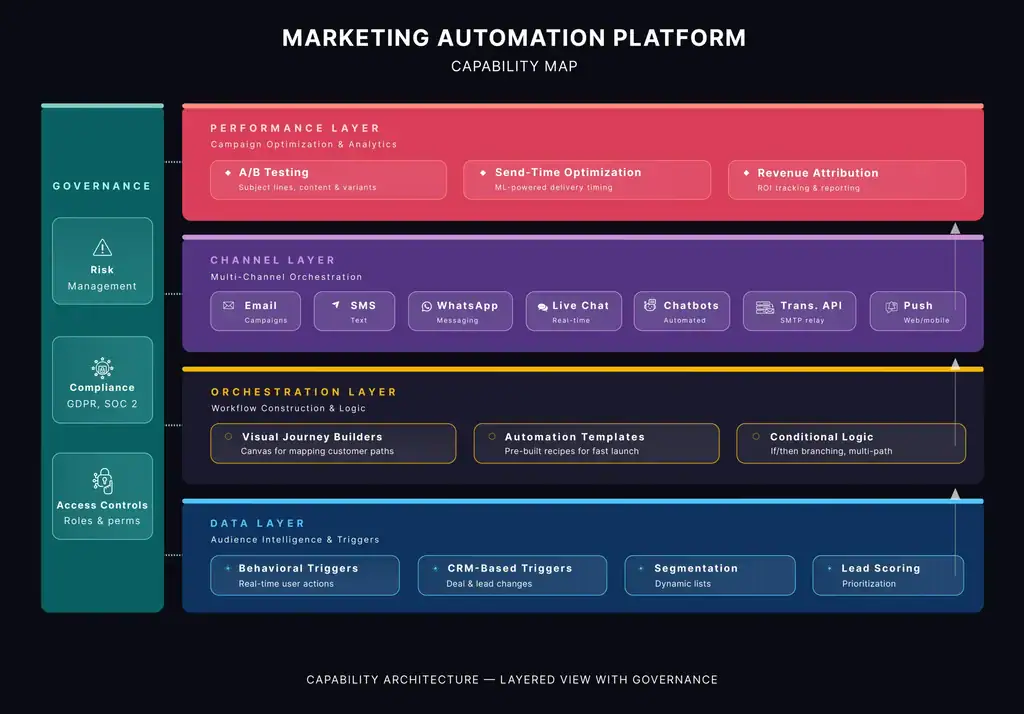
In the X-Ray Approach, we introduced a five-layer capability framework that replaces feature checklists with a structured way to assess what a platform can actually do. The five layers are:
Data Layer — what data the platform can ingest, store, and act on. Orchestration Layer — the logic engine: triggers, branching, conditions, timing. Channel Layer — how it reaches people: email, SMS, push, ads, and how native each channel is. Performance Layer — what it can measure: attribution, A/B testing, revenue tracking. Governance Layer — compliance, deliverability, access controls, audit trails.
In this post, we put that framework to work. We take five B2C automations that most growing businesses need and run each one through all five layers. The result is a practical evaluation checklist: when you sit down with a vendor, you will know exactly which questions to ask and exactly which answers should concern you.
Use Case 1: Abandoned Cart Recovery
The absolute minimum, baseline test. If a platform cannot do this well, disqualify it immediately.
Abandoned cart recovery is the simplest automation in this post and the most forgiving in terms of platform requirements. That makes it a useful floor test: any vendor you are considering should handle this flawlessly. If they struggle here, do not bother evaluating the rest.
The automation: a customer adds items to their cart, leaves without purchasing, and receives a timed sequence of reminders — typically at one hour, twenty-four hours, and seventy-two hours. The final touch may include a small incentive. The sequence suppresses if the customer completes the purchase.
5-Layer evaluation
Capability Layer | What to Look For | Vendor Questions to Ask |
Data | Real-time cart event capture. Visitor identification for non-logged-in users. Product catalogue sync (images, prices, stock). | How does the platform identify anonymous visitors? What is the lag between cart event and trigger availability? |
Orchestration | Time-delayed triggers. Purchase suppression. Conditional incentive escalation across steps. | Can I suppress mid-sequence if the customer purchases? Can I escalate incentives conditionally without building separate workflows? |
Channel | Transactional email with dynamic product blocks. High inbox placement rates. | Are cart emails sent via a transactional or marketing sending infrastructure? What are current deliverability benchmarks? |
Performance | Revenue attribution per email in sequence. Recovery rate. A/B testing on timing and incentive. | Can I attribute revenue to a specific step in the sequence? Can I A/B test delay intervals, not just subject lines? |
Governance | CAN-SPAM/GDPR compliance on transactional emails. Unsubscribe handling that does not suppress order confirmations. | If a customer unsubscribes from marketing, do they still receive cart recovery? How are transactional vs marketing classifications handled? |
What separates vendors here: not much. Mailchimp, Brevo, Klaviyo, ActiveCampaign, HubSpot — they all handle abandoned cart adequately. We ran Brevo through this exact framework in our X-Ray platform evaluation if you want to see a detailed vendor teardown. The real differentiation begins with the next use case.
Use Case 2: Post-Purchase Onboarding
The first test of data layer depth. Can the platform adapt content based on what was purchased?
Post-purchase onboarding is where you start to see real differences between platforms. The automation itself is straightforward: after a purchase, send a structured sequence that sets delivery expectations, teaches usage, and introduces a logical next step (cross-sell, replenishment, loyalty enrolment).
The complication is that the sequence must be product-aware. A skincare brand needs usage guides timed to product lifecycle. A travel company needs destination tips and experience upsells. An online grocery needs reorder prompts timed to consumption. If your platform can only trigger on “purchased” but cannot branch by product type, category, or value, you are forced into building dozens of separate workflows instead of one intelligent sequence. The AI-powered personalisation capabilities emerging in retail make this even more critical — your platform needs to support the data layer that AI personalisation depends on.
5-Layer evaluation
| Capability Layer | What to Look For | Vendor Questions to Ask |
| Data | Order sync with line items, not just totals. Product category/type tagging. Purchase history for repeat buyer identification. | Does the platform sync individual line items or just order-level data? Can I segment by product category natively? |
| Orchestration | Conditional branching by product type. Dynamic wait steps (replenishment varies by product). Action-based exits. | Can I branch a workflow on “purchased item in category X with value above Y”? Or only on “purchased vs did not purchase”? |
| Channel | Dynamic content blocks adapting per product purchased. SMS/push for delivery alongside email for education. | Can email content dynamically pull product-specific details? Or do I need separate templates per product line? |
| Performance | Repeat purchase rate by cohort. Time-to-second-purchase. Sequence engagement per step. | Can I track repeat purchase rate for customers who went through onboarding vs those who did not? Is cohort analysis native? |
| Governance | Marketing vs transactional messaging distinction. Opt-out that preserves order updates. | How does the platform classify onboarding emails — marketing or transactional? What happens to the sequence if a customer opts out of marketing? |
The question that exposes the gap: “Can I build one workflow that branches by product category and adjusts wait times per product, or do I need to build a separate workflow for each product line?” If the answer is the latter, multiply that complexity by your number of product categories and decide whether that is sustainable.
Use Case 3: Browse Abandonment and Behavioural Triggers
The data layer stress test. This is where entry-level platforms fall out of the evaluation.
Browse abandonment catches intent earlier than cart recovery — when someone has viewed products or categories but has not added anything to the cart. The audience is much larger, and while per-email conversion rates are lower, the volume compensates.
But browse abandonment demands something fundamentally different from the platform: website behavioural tracking at the product or category level, matched to known contacts. This is not a standard feature on entry-level tools. It requires the platform to capture on-site behaviour, associate it with a contact record, and make that data available as a trigger condition — all in near real-time.
The specificity matters. A “come back and shop” email converts poorly. A “You were looking at running shoes — here are this week’s picks in your size” email converts well. The difference is entirely in the data layer.
5-Layer evaluation
Capability Layer | What to Look For | Vendor Questions to Ask |
Data | Website behavioural tracking at product/category level. Session-to-contact matching. Browse recency and frequency scoring. | Does the platform offer native site tracking? Can I track specific products viewed, not just page URLs? How does it match anonymous sessions to known contacts? |
Orchestration | Event triggers on browse behaviour. Purchase suppression. Dynamic content from browsed products. | Can I trigger a workflow when someone views a product category three times without purchasing? Can I suppress if they buy within a set window? |
Channel | Real-time product recommendation blocks. Retargeting ad audience sync. | Does the email pull browsed products dynamically or do I hardcode recommendations? Can I sync browse segments to ad platforms natively? |
Performance | Browse-to-purchase conversion. Revenue per browse email. Cannibalisation analysis. | Can I measure whether browse abandonment emails are discounting people who would have purchased anyway? Is incrementality reporting available? |
Governance | GDPR-compliant tracking consent. Cookie policies. Frequency caps. | How does the platform manage consent for behavioural tracking? Can I set frequency caps per contact across browse, cart, and promotional emails? |
This is the evaluation stage where you lose vendors. Mailchimp does not offer native site tracking for browse abandonment. ActiveCampaign does through its site tracking feature. Klaviyo was built for this. HubSpot handles it well at Professional tier and above. If browse abandonment is core to your model, this single capability will narrow your shortlist significantly.
Use Case 4: Win-Back for Lapsed Customers
The orchestration layer stress test. Can the platform think in relative time, not fixed dates?
Win-back automation targets customers who have not purchased within a defined window: thirty days for subscriptions, ninety for fashion, six months for furniture. The key requirement is that this window must be calculated per individual customer, relative to their last purchase date. This is fundamentally different from sending a batch campaign to a segment.
The sequence moves through escalating phases: soft re-engagement, stronger incentive, final offer, then suppression. The platform needs to manage the timing per person, escalate conditionally, and automatically sunset contacts who do not respond.
5-Layer evaluation
Capability Layer | What to Look For | Vendor Questions to Ask |
Data | Purchase recency per customer. CLV for prioritisation. Product affinity for personalised offers. | Can the platform calculate “days since last purchase” per contact natively? Or do I need to create and maintain a custom date field via external sync? |
Orchestration | Date-relative triggers per individual. Multi-step escalation. Automatic suppression for non-responders. | Can I set a trigger for “90 days after last purchase” that recalculates per contact? Or is this a static segment I need to refresh manually? |
Channel | Unique discount code generation. SMS escalation for high-value lapsed customers. | Does the platform generate unique single-use discount codes natively? Or do I need a third-party coupon tool? |
Performance | Reactivation rate. Revenue per reactivated customer vs acquisition cost. Deliverability impact. | Can I isolate revenue from win-back campaigns vs organic returns? Can I see the impact of win-back on sender reputation? |
Governance | Sunset policy enforcement. Automatic suppression of persistently unengaged. | Does the platform have built-in sunset policies or do I build them manually? What happens to suppressed contacts — deleted or excluded from sends? |
The killer question: “Can your platform trigger an automation based on a date-relative condition that recalculates continuously per contact?” Some platforms support this natively. Others require workarounds using custom properties, external scripts, or daily segment refreshes. The workarounds work until they do not — edge cases (multiple orders, partial refunds, exchanges) tend to break fragile implementations.
Use Case 5: Review and Referral Request
The integration architecture stress test. This automation cannot live inside a single platform.
Review and referral automation is the most demanding use case in this post, not because of any single capability but because it requires your marketing platform to coordinate with systems outside its own walls: your fulfilment system (to trigger at delivery, not purchase), your review platform (Trustpilot, Google, Yotpo), and potentially a referral tool (ReferralCandy, Friendbuy).
Timing is product-specific: three days post-delivery for consumables, two weeks for electronics, immediately for experiences. The routing must be sentiment-aware: positive reviewers get a referral ask, negative reviewers get routed to customer service. None of this works without reliable data flowing between systems.
5-Layer evaluation
Capability Layer | What to Look For | Vendor Questions to Ask |
Data | Fulfilment/delivery status sync. Review completion tracking. Sentiment/rating data from review platform. | How does delivery data get into the platform? Native integration with my fulfilment tool, or Zapier/custom webhook? What is the lag? |
Orchestration | Event trigger on fulfilment event. Conditional split on review sentiment. Integration with review and referral platforms. | Can I trigger on a delivery event from my fulfilment system? Can I branch based on the review rating a customer leaves on an external platform? |
Channel | SMS for review requests. Email for referral details. Deep links to review submission pages. | Can I send an SMS with a direct link to leave a Google review? Can the review request format adapt per review platform? |
Performance | Review generation rate. Referral conversion rate. NPS correlation. | Can I attribute new customer acquisition to a specific referral source within the platform? Or do I need a separate referral analytics tool? |
Governance | Google review policy compliance (no incentivised reviews). Frequency controls across post-purchase comms. | How does the platform prevent sending both a review request and a cross-sell email on the same day? Are there global frequency caps across automation types? |
This use case reveals your integration architecture reality. If your marketing platform, fulfilment system, review platform, and referral tool all speak to each other natively, this automation is straightforward. If each connection requires Zapier, custom webhooks, or manual data exports, you are building on duct tape. The question for your vendor is not “can you do this” but “how many systems do I need to glue together, and what breaks when one of them updates its API?”
How to Use This Framework in Your Vendor Evaluation
You now have twenty-five specific evaluation criteria (five use cases × five layers) and twenty-five questions to put to every vendor on your shortlist. Here is how to turn this into a practical evaluation:
Step 1: Identify your use cases. The five in this post are common, but your business may prioritise differently. If you are a subscription brand, replenishment automation might matter more than browse abandonment. If you are a marketplace, seller-side automation adds another dimension. Start with the automations that drive the most revenue for your specific model. Our SMB’s Guide to Building a Modern Demand Gen Stack can help you identify which capabilities matter at your current maturity stage.
Step 2: Run each use case through all five layers. For each automation, ask: what data does this need? What orchestration logic? Which channels? What do I need to measure? What compliance requirements apply? Use the tables in this post as a template.
Step 3: Score each vendor against the full picture. Not just “can they do abandoned cart” (they all can) but “can they handle the orchestration demands of win-back and the integration demands of review automation?” The platform that scores well across all five use cases at all five layers is the one that will not need replacing in eighteen months.
This is exactly the process our Martech Stack Planning service runs for clients — mapping required capabilities across your actual business use cases, scoring your current and candidate platforms against them, and producing a prioritised roadmap. The difference is that we do it across your entire stack, not just marketing automation, and we draw on a library of over 200 business capabilities compiled from two decades of CRM and marketing consulting.
If your evaluation is uncovering data layer gaps — particularly around behavioural tracking, customer data unification, or AI readiness — our AI Strategy for Marketing assessment identifies which capabilities are realistic given your current data maturity and which need foundational work first.
Ready to stop guessing? Book a free discovery call and we will walk through your current stack, your target use cases, and where the gaps are.


