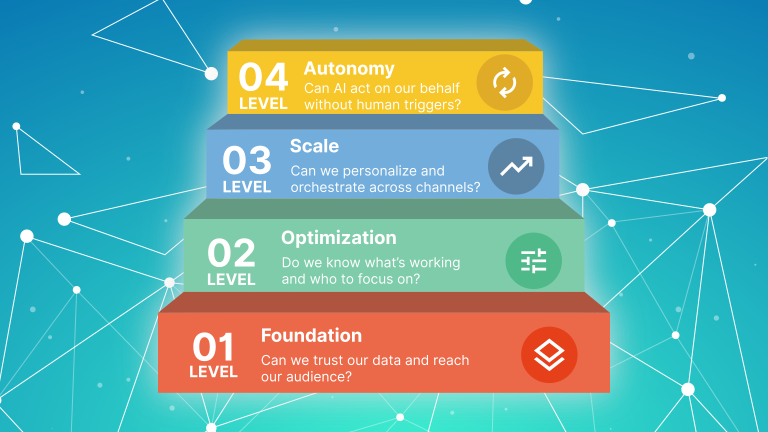

This is the hub post for Datawhistl's Marketing Automation Stack Planning content cluster. It covers the complete capability-led methodology — from auditing your current platform to mapping what your business actually needs, identifying gaps, understanding integration architecture, and sequencing what to do next.
Most martech stacks are accidents. A CRM was chosen because the sales director used it at a previous company. An email platform was added because it was free. A form builder came with the website. An analytics tool was bolted on when someone asked why open rates were falling. A reporting platform appeared after a bad board meeting. Over time, the stack grows — not because someone decided it should, but because individual problems got individual solutions.
The result is a collection of tools that are expensive to maintain, difficult to integrate, and incapable of supporting the marketing use cases the business actually needs. Nobody planned it this way. It just happened.
The capability-led approach is the alternative. Instead of starting with tools, you start with capabilities: what does your business need marketing to do? What data does that require? What orchestration logic? Which channels? What does good measurement look like? What governance and compliance constraints apply? Once you have clear answers, you can evaluate which platforms support those capabilities — and which parts of your current stack are duplicating, missing, or failing to deliver.
What This Guide Covers
| Section | What it covers |
| Section 1 | Why capability-led beats tool-first — the problem with how most stacks are built |
| Section 2 | The 5-Layer Capability Framework — the evaluation structure that runs through everything |
| Section 3 | How to audit your current stack — what you have and what it’s actually doing |
| Section 4 | Capability mapping — what your business actually needs marketing to do |
| Section 5 | Gap analysis — overlaps, redundancies, and missing capabilities |
| Section 6 | Integration architecture — how the pieces connect and where the duct tape is |
| Section 7 | Sequencing a 12-month roadmap — dependency mapping and migration strategy |
| Section 8 | Cost estimation — tools, implementation, and total cost of ownership |
Why Capability-Led Beats Tool-First Approach
Start thinking capabilities and not tool features
The tool-first approach to martech buying looks like this: a problem appears (our email platform doesn’t do SMS), someone researches solutions, a vendor is selected, a contract is signed. The problem is solved. Temporarily. Until the new tool doesn’t integrate cleanly with the existing stack, or duplicates a capability already paid for, or solves the immediate problem but creates three new ones downstream.
The capability-led approach inverts this. Before evaluating any tool, you define what the tool needs to do — not in feature terms, but in business outcome terms. What use cases must marketing support? What data does each use case require? What orchestration logic? What channels? Once the capability requirements are clear, tool evaluation becomes a process of matching candidates against a defined specification rather than comparing feature grids.
The difference in practice is significant. Tool-first buying produces stacks with high redundancy (multiple tools doing the same job), high integration debt (connections built to compensate for poor tool fit), and poor strategic alignment (tools that were right for a previous growth stage but are now bottlenecks). Capability-led buying produces stacks where each tool has a clear remit, integration architecture is planned rather than improvised, and the stack can actually scale.
The average SMB marketing stack contains 12 tools. Studies consistently show 25–40% capability overlap between them. That redundancy is not just wasted spend — it is fragmented data, inconsistent reporting, and integration maintenance that consumes engineering time that should be spent on growth.
For a ground-level view of what this looks like at different business maturity stages, our SMB’s Guide to Building a Modern Demand Gen Stack maps the right capabilities for early, growth, and scale-stage businesses. The capabilities that matter at £500K revenue are not the same ones that matter at £5M.
The 5-Layer Capability Framework
Structured approach to identifying marketing automation capabilities
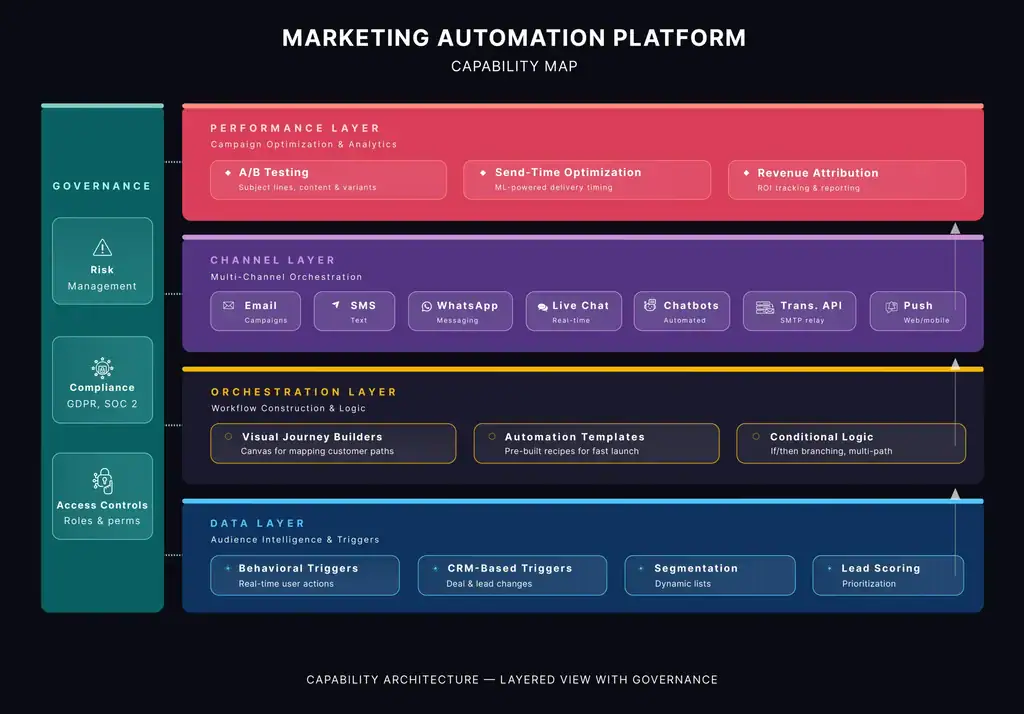
The framework structures every capability assessment around five layers. Each layer maps to a distinct dimension of what a marketing platform does. Evaluating all five — rather than just the obvious feature set — is what separates a platform that works in a demo from one that works in production.
| Layer | What it covers | Why it matters | Go deeper |
| Data | What data the platform can ingest, store, and act on. CRM and contact data, behavioural signals, transactional history, enrichment. | Every downstream capability depends on the quality and completeness of the data layer. Poor data makes scoring unreliable, personalisation generic, and attribution impossible. | Data Layer Audit → |
| Orchestration | The logic engine: triggers, branching, conditional logic, timing, goal exits, and sequence depth. | This is where ‘automation’ either works or doesn’t. The gap between Level 1 (pre-built templates) and Level 3 (full conditional logic) is invisible on a feature comparison grid. | |
| Channel | How the platform reaches contacts: email, SMS, push, WhatsApp, social, retargeting. Whether each channel is native or bolted on. | Native channels share data and orchestration. Bolted-on channels add cost, latency, and integration fragility. The distinction is rarely surfaced in vendor pitches. | |
| Performance | What the platform can measure: revenue attribution, A/B testing, cohort analysis, deliverability reporting, AI-powered insights. | Most platforms report on what happened. Fewer tell you why, or what to do next. Measurement depth determines whether you can improve rather than just observe. | Covered in vendor teardowns |
| Governance | Compliance, consent management, access controls, audit trails, data retention, and deliverability infrastructure. | Governance is the layer most commonly skipped in evaluation and most painfully discovered in production. GDPR exposure, deliverability problems, and access control failures all live here. | Covered in vendor teardowns |
The framework is put to work in two ways across this cluster. First, as a vendor evaluation tool — running a specific platform through all five layers to produce an honest capability map. We’ve done this for Brevo and Mailchimp. Second, as a use case stress test — taking real business automations and asking what each layer needs to support them. The B2C post and B2B post do this across five use cases each, progressively exposing where different platforms fall short.
How to Audit Your Current Stack
Start with an honest picture of where you are
Before planning what your stack should become, you need an accurate picture of what it currently is — not the tools you are paying for, but what those tools are actually doing, how well they are integrated, and what the real cost of the current state is.
Step 1: Inventory what is actually live List every active automation, sequence, and journey currently running in your platform. For each one: when was it last reviewed, is it performing, and is it still relevant to the current business? Dead automations that fire to the wrong audience, sequences built for a product that no longer exists, and welcome emails that reference an old brand are common findings. They are also deliverability risks.
Step 2: Identify what is configured but broken Separate from what is live, list anything that was set up but is not functioning correctly — automations that fire at the wrong time, segments that return unexpected contact numbers, lead scoring that nobody trusts. These are usually data layer problems: the logic is right but the inputs are wrong. The [Data Layer Audit] is the diagnostic tool for this specifically.
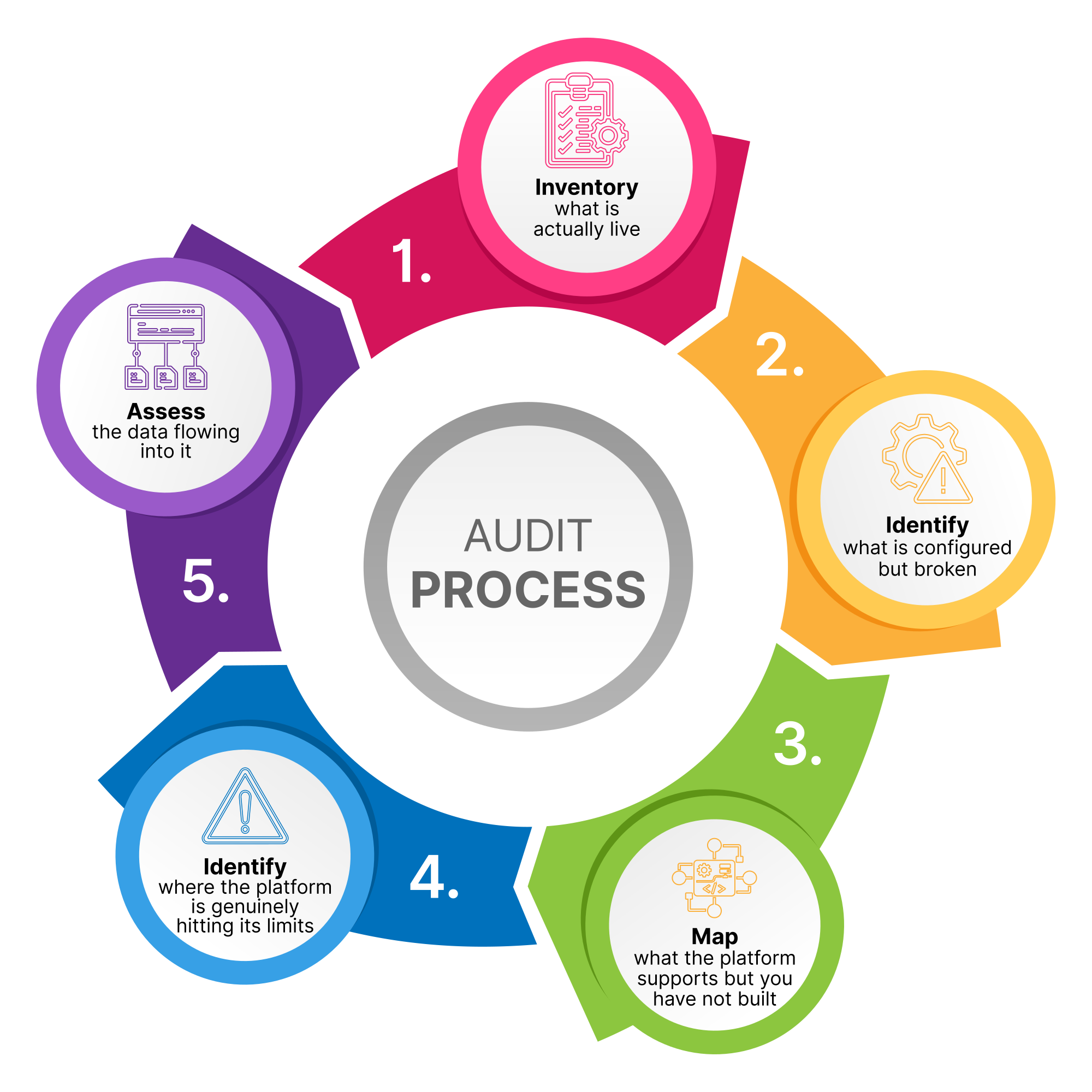
Step 3: Map what the platform supports but you have not built Review your platform’s capability set against the use cases your business needs to run. Which automations are technically possible in your current platform but have not been built? The answer is often significant — businesses routinely pay for platform tiers that support capabilities they have never implemented. Before concluding that the platform is inadequate, establish whether the constraint is the platform or the resource and prioritisation decisions made around it.
Step 4: Identify where the platform is genuinely hitting its limits This is the honest question: which use cases have you tried to build and could not, because the platform’s orchestration logic, data access, or channel capabilities were insufficient? These are genuine platform gaps — not underutilisation. The B2C and B2B use case posts are useful here: run your required automations through the 5-layer framework and identify which layer is the constraint.
Capability Mapping — What Your Business Actually Needs
Map business use cases to specific data/technology capabilities
Capability mapping answers the question: what does marketing need to do for this business, at this stage of growth, to hit its goals? It is not a list of features you want. It is a structured definition of the use cases that drive revenue — and what each one requires from the platform at every layer.
Start with business use cases, not platform features
This section assumes you already have a prioritised list of the marketing automation use cases your business needs to run. Identifying and prioritising those use cases is a separate exercise — one that sits outside this framework and depends on your business model, growth stage, and revenue priorities.
Once you have your use cases, the framework’s job is to answer one question for each: can your current platform support this, and if not, where exactly does it break down?
The B2C platform selection post runs all five B2C use cases through the 5-layer framework with specific vendor questions for each. The B2B post does the same for B2B. These are the most practical starting points for capability mapping if your business fits either model
Define requirements at each layer for each use case
For each use case you identify, work through what it requires at each layer. What data does it need — and does that data exist in your stack in a usable form? What orchestration logic does it require — simple triggers or complex conditional branching? Which channels does it use, and does the platform support them natively? What does a good measurement of this use case look like? Are there specific compliance requirements?
Worked example: Win-back automation for a D2C fashion brand
The business need is straightforward: re-engage customers who have not purchased in 90 days with a personalised sequence that escalates from soft re-engagement to a final incentive, then suppresses contacts who do not respond.
Now run it through the 5-layer framework:
Data — the automation needs to calculate “days since last purchase” per individual customer, continuously and in real time. It also needs purchase value history to prioritise high-value lapsed customers for a stronger incentive, and product affinity data to personalise the content. If your platform cannot access per-contact purchase recency natively — if you are maintaining a custom date field via a daily Zapier sync from your ecommerce platform — this use case is already fragile before you have written a single email.
Orchestration — the trigger must recalculate per contact, not fire on a static segment refresh. The sequence must escalate conditionally (soft message → stronger message → final incentive) and suppress automatically when a purchase occurs mid-sequence. If your platform only supports fixed-date triggers or requires you to rebuild a new segment daily to catch newly lapsed contacts, the orchestration layer is the constraint.
Channel — the final escalation step may need to go via SMS for high-value customers who are not opening email. If SMS is a bolt-on integration rather than native, the suppression logic across both channels becomes a separate problem to solve.
Performance — you need to measure reactivation rate and revenue per reactivated customer, and distinguish between contacts who purchased because of the automation versus those who would have returned anyway. If your platform cannot isolate automation-influenced revenue, you cannot optimise the sequence or justify the incentive cost.
Governance — the platform needs a sunset policy: contacts who go through the full sequence without responding should be suppressed from future sends automatically, not left on the active list degrading your deliverability.
The finding: if you run this exercise and hit a wall at the Data layer — purchase recency is not natively accessible, or requires a fragile daily sync — the answer is not necessarily a new platform. It may be a data integration fix. If the wall is at Orchestration — the platform genuinely cannot do per-contact date-relative triggers — that is a platform constraint worth factoring into any evaluation.
Match capability requirements to maturity stage
Not every capability is right for every stage of growth. A business with 2,000 contacts and one marketer does not need account-based marketing orchestration. A business with 50,000 contacts and a marketing team of five probably does. The SMB demand gen stack guide maps which capabilities matter at early, growth, and scale stages — useful context for deciding which gaps are worth fixing now versus later.
Gap Analysis — Overlaps and Missing Capabilities
Identify what's missing, redundant, and underperforming
Gap analysis takes the output of your audit (what you have) and your capability map (what you need) and identifies the delta. There are three types of gap to look for:
- Missing capabilities: use cases your business needs to run that your current stack cannot support. These are the gaps that most directly cost revenue.
- Redundant capabilities: tools or features that duplicate each other, creating unnecessary spend and data fragmentation.
- Underperforming capabilities: use cases that are technically possible in your stack but are not working well because of data quality issues, integration failures, or misconfiguration.
The data layer is where most underperforming capabilities originate. A personalisation engine that exists in your platform but returns generic output is usually a data layer problem — inconsistent contact fields, missing behavioural data, or transactional history that is not connected to the marketing platform. The Data Layer Audit is the diagnostic tool for this specifically.
Bad data is frequently the root cause of both missing and underperforming capabilities — the tools are there, but the inputs are too poor for them to function. Our post on why bad data costs sales teams 40% of their time covers the downstream consequences of data quality problems that originate in the marketing stack.
Reference Architecture — How Your Systems Should Connect
Define a conceptual reference architecture for the to-be state
A reference architecture defines the canonical data flows for your marketing automation use cases — not just which systems are connected, but what data moves between them, in which direction, at what frequency, and which system is the master record for each data type. It is the blueprint against which you assess whether your current setup is fit for purpose.
Most SMB marketing stacks do not have a defined reference architecture. Systems were connected as needs arose, integrations were built to solve immediate problems, and the result is a set of point-to-point connections that work individually but have no coherent structure.
A typical example: a D2C fashion brand running Shopify, Klaviyo, and HubSpot CRM. Shopify connects to Klaviyo via the native integration — order data flows across and powers abandoned cart and post-purchase automations. HubSpot connects to Klaviyo via Zapier — contact records sync daily so the sales team can see email engagement. Shopify connects to HubSpot via a separate Zap — order history syncs nightly so customer value is visible in the CRM.
On paper, everything is connected. In practice, the architecture has no coherent structure and three specific failure modes. First, the daily Zapier sync between Shopify and HubSpot means a customer’s purchase recency in HubSpot is always up to 24 hours stale — which matters when a sales rep is deciding whether to call a lapsed customer who actually purchased this morning. Second, the contact record exists in all three systems with no defined master: email address is the identifier, but name formatting, phone number, and subscription status have drifted apart across platforms — Klaviyo shows one value, HubSpot another, and nobody knows which to trust. Third, when the brand wants to build a win-back automation that prioritises high-value customers, Klaviyo cannot access the lifetime value calculation that lives in HubSpot, because the Zapier sync only passes basic contact fields, not calculated properties.
None of the individual integrations is broken. The architecture as a whole cannot support the use cases the business needs to run.
Defining your reference architecture starts with four structural questions:
- What is the master record for contact identity? Which system is the source of truth that all others sync to and from? For most B2B businesses this is the CRM. For most B2C ecommerce businesses it is the MAP or the ecommerce platform. In the example above, none of the three systems was designated the master — which is why the same contact had three different values for subscription status across Shopify, Klaviyo, and HubSpot.
- What is the event source for each trigger type? Which system fires the signal that starts each automation? Purchase events from the ecommerce platform, CRM stage changes from the CRM, behavioural signals from the website tracking layer. Each trigger type has a source system, and that system must be able to deliver the event to the MAP reliably and at the right latency.
- What is the required data latency for each use case? Does the data need to arrive in real time, within minutes, within hours, or is a daily batch acceptable? Abandoned cart requires near-real-time event delivery. Monthly reporting can tolerate a daily sync. The Shopify-to-HubSpot sync in the example above was daily — which was fine for reporting, but broke down the moment a sales rep needed to know whether a lapsed customer had purchased that morning.
- What is the integration tier for each connection? Native integration, iPaaS, custom API, or a central data layer? The right tier depends on data volume, latency requirements, transformation complexity, and the business criticality of the connection. Choosing the wrong tier is the most common source of integration debt.
How reference architecture affects capability
Reference architecture directly determines which capabilities are achievable. Browse abandonment automation requires near-real-time data flow between your website and marketing platform — a daily batch sync via Zapier will not support it. Lead scoring that incorporates website behaviour requires a reliable, low-latency connection between your tracking pixel and your scoring engine. Customer expansion automation requires product usage data, CRM data, and support data to converge — which typically requires either a CDP or a carefully architected set of API integrations.
For AI-powered use cases specifically, the integration architecture requirements are more demanding still. Predictive scoring, recommendation engines, and personalisation at scale all require data to be clean, complete, and available in real time — and the integration architecture is what determines whether that is achievable. The Data Layer Audit covers the data side; the integration architecture post covers the pipeline side.
Sequencing a 12-Month Roadmap
The action plan
Dependency mapping
Not all gaps can be closed in any order. Some capabilities are prerequisites for others. Lead scoring requires behavioural tracking to be working first. Account-based orchestration requires account-level data to be clean and CRM integration to be reliable. AI-powered personalisation requires a data layer with sufficient depth and consistency to train models on.
Map the dependencies explicitly before sequencing. The order of work is: data layer first, integration architecture second, orchestration capabilities third, channel expansion fourth. This is not arbitrary — it reflects the logical dependency chain. You cannot build reliable orchestration on a broken data layer, and you cannot expand channels if the integration architecture cannot support them.
Migration strategy
Platform migrations — moving from one MAP to another, or adding a new CRM — are the highest-risk events in the roadmap. The most common failure mode is parallel running that stretches on indefinitely, creating data inconsistency between systems and confusion about which is the source of truth.
A clean migration requires: a defined cutover date, a contact data audit before migration (not after), a clear mapping of all automations and their equivalents in the new platform, a parallel testing period with defined acceptance criteria, and a rollback plan. Platform migrations done badly are expensive to fix — data that is corrupted during migration, automations that fire incorrectly in the transition period, and deliverability damage from a poorly managed domain transition can take months to resolve.
Prioritisation framework
When sequencing, prioritise in this order: revenue-generating automations that are currently broken or absent (highest immediate impact), data layer fixes that unblock multiple downstream capabilities (highest leverage), redundancy elimination that funds the rest of the roadmap (frees budget), and new capability additions (lowest risk when the foundation is solid).
Cost Estimation
What the Full Picture Actually Costs With Different Platform Choices
Once you have completed the audit, use case mapping, gap analysis, and reference architecture, you have enough information to build a cost model that reflects reality rather than a vendor comparison page. Most platform cost comparisons fail because they start and end with licence fees. The capability-led process gives you four additional inputs that change the calculation significantly.
- Licence fees look different when you know your actual requirements. Rather than comparing headline pricing, you can now map your specific use cases to the plan tier that actually supports them. Lead scoring on HubSpot requires Professional tier minimum — that is a different price point than the Starter plan a vendor sales rep might quote you. Predictive segments on Mailchimp require Standard tier. Multi-contact opportunity nurture on Marketo requires a configuration investment that does not appear in any pricing grid. The use case map and 5-layer assessment tell you which tier you actually need, not which tier looks affordable in a demo.
- Implementation costs are now scoped, not estimated. You know which automations need to be built, which data integrations need to be established, and what the reference architecture requires. A realistic implementation cost is not a percentage of licence fee — it is a line-by-line build estimate: automation rebuilds, data migration, integration development, and testing. The reference architecture gap assessment tells you exactly how much integration work is required and at which tier, which is the primary driver of implementation cost variation between platforms.
- Integration and maintenance costs are quantifiable from the reference architecture. If your target reference architecture requires three native integrations, one custom API build, and the retirement of four Zapier connections, you can price that specifically. If it requires a daily Zapier sync replaced by a real-time API integration, you can estimate the development cost and the ongoing maintenance reduction. Without the reference architecture, integration costs are guesswork. With it, they are a scoped line item.
- The cost of the current gaps is now visible. The gap analysis identified use cases that are configured but broken, use cases the platform cannot support, and use cases that have never been built. Each of those gaps has a revenue cost — win-back automations not running, lead scoring not qualifying contacts, browse abandonment not triggering. Quantifying even one or two of those gaps in revenue terms reframes the entire cost conversation: the question is no longer whether a new platform costs more than the current one, but whether the capability delta justifies the investment.
The output of this analysis gives the CTO or Head of Marketing Operations a defensible cost picture for the first time — not a licence comparison, but a full programme cost: what the right platform tier actually costs at your use case requirements, what the implementation and integration build costs, what the ongoing maintenance costs once the reference architecture is in place, and what the current gaps are costing in foregone revenue. That is the business case for the investment, built on evidence rather than a vendor pitch.
From Methodology to Implementation
The methodology in this guide — audit, capability map, gap analysis, integration architecture, sequencing, cost model — is the process Datawhistl runs for every marketing automation stack planning engagement.
The difference between doing this yourself and doing it with external support is primarily speed and perspective. Internally, the audit tends to be optimistic (people defend tools they chose), the capability map tends to reflect current limitations rather than what’s possible, and the sequencing tends to deprioritise foundational work (data layer, integration architecture) in favour of visible quick wins. External perspective closes those gaps.
What a capability-led marketing automation planning engagement delivers:
- Current platform audit — an honest assessment of what your MAP is actually doing versus what it is capable of, including live automations, broken configurations, underutilised capabilities, and data quality issues feeding into it
- Prioritised use case map — a structured list of the marketing automation use cases your business needs to run, mapped to your business model and growth stage, with a clear prioritisation rationale
- 5-layer capability assessment — each priority use case run through the Data, Orchestration, Channel, Performance, and Governance layers against your current platform, identifying exactly where and why each use case works or breaks down
- Gap analysis — a clear separation of three gap types: use cases the platform cannot support (genuine platform gaps), use cases that are configured but not working (data or integration gaps), and use cases that are possible but have not been built (resource or prioritisation gaps)
- Reference architecture — a documented blueprint of the data flows required to support your priority use cases: master record definitions, event sources and trigger latency requirements, integration tiers for each system connection, and a gap assessment of the current state against the target architecture
- Platform recommendation — a structured verdict on whether the current platform should be retained, reconfigured, extended, or replaced, with specific reasoning at each capability layer
- Sequenced 12-month roadmap — a dependency-ordered action plan covering data layer fixes, integration architecture changes, automation builds, and any platform migration, with clear sequencing rationale
- Cost model — total cost of ownership across licence fees, implementation, integration maintenance, and opportunity cost of the current gaps, with projections at 12, 24, and 36 months
If you are at the stage of planning a stack review, a platform migration, or a significant new capability investment, our Martech Stack Planning service is the starting point. If the primary concern is AI readiness — understanding whether your data layer and tooling can support the AI use cases you are being sold — the AI Strategy and Readiness Assessment is the more focused option.
Additional Reading
Platform evaluations
- The X-Ray Approach to Marketing Automation Platform Evaluation (Brevo)
- Mailchimp Through the Capability Map: A 5-Layer Platform Evaluation
Use case stress tests
- B2C Platform Selection: Using the 5-Layer Framework to Compare Marketing Automation Vendors
- B2B Platform Selection: Using the 5-Layer Framework to Compare Marketing Automation Vendors
Capability layer deep-dives
- The Data Layer Audit: Is Your Marketing Stack AI-Ready?
- The Orchestration Layer: Templates vs. Conditional Logic (coming soon)
- The Channel Layer: Native vs. Bolted-On Multi-Channel (coming soon)
Practical planning and decisions
- Stack Rationalisation: How to Find the Money You’re Wasting on Redundant Martech (coming soon)
- Integration Architecture for SMBs: When Zapier Is Enough and When It Isn’t (coming soon)
Related reading