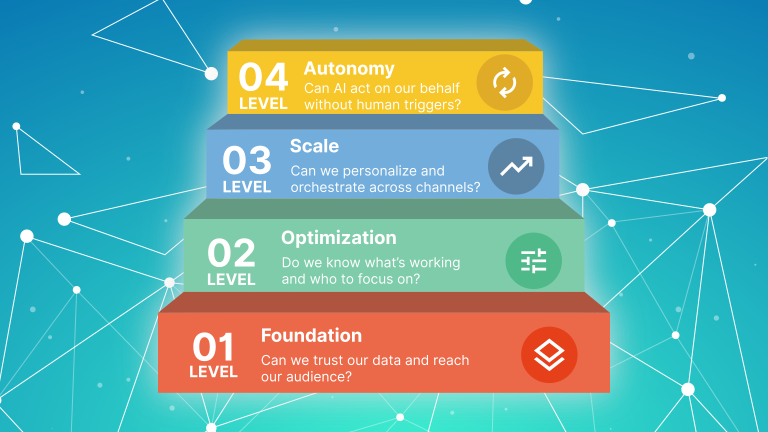

Every AI marketing tool pitch follows the same pattern. The vendor shows you a dashboard of personalised journeys, predictive lead scores, or product recommendation engines. It looks compelling. You ask about implementation. They say it’s straightforward. You sign. Six months later, the AI features are switched off because the data isn’t clean enough to power them.
The problem is almost never the AI tool. It’s the data layer it’s sitting on top of.
The data layer is the foundation of your marketing stack. It’s where contact records live, where behavioural signals are captured, where transactional history is stored, and where external enrichment feeds in. If this foundation is broken — incomplete records, siloed behavioural data, no transactional history connected to marketing, or enrichment that hasn’t been refreshed in two years — better orchestration and more channels won’t help. You’re building on sand.
This post gives you a practical self-diagnosis framework to assess your own data layer. It’s structured around four components, with specific questions for each. It then covers what AI use cases actually require from the data layer — not what vendors claim, but what is genuinely needed. Finally, it looks at the three most common data layer architectures for SMBs and when each one makes sense.
This is one of the five layers in the capability framework we use at Datawhistl to evaluate and plan marketing stacks. You can see the data layer assessed at the platform level in our Brevo capability evaluation and Mailchimp capability evaluation. This post goes deeper on the data layer itself — what it should contain, how to diagnose it, and what it needs to look like before AI becomes viable.
Section 1: The Four Components of a Marketing Data Layer
Most marketers think of their data layer as their email list. It’s much more than that. A functioning marketing data layer has four components, and weakness in any one of them limits what the rest of the stack can do.
1. CRM and contact data
This is your foundational record of who your contacts are: name, company, role, lifecycle stage, contact history, and any custom fields your business uses. It should be clean, consistently structured, and up to date. In practice, most SMB CRMs contain a significant proportion of contacts with missing fields, outdated job titles, or duplicate records.
For B2B businesses, contact data quality directly affects every downstream activity — segmentation, lead scoring, sales handoffs, and attribution. As we cover in our post on why bad data costs sales teams 40% of their time, the damage from poor CRM data is not abstract. It shows up in missed follow-ups, wrong-fit outreach, and reporting that cannot be trusted.
2. Behavioural data
Behavioural data is the record of what your contacts do: which pages they visit, which emails they open and click, what content they download, which products they browse, and how frequently they engage. This is the data that powers personalisation, lead scoring, and triggered automation.
The gap here is usually between email behavioural data (which most platforms capture well) and site behavioural data (which requires a tracking pixel or integration). Many SMB stacks capture email opens and clicks but have no connection between that data and website activity. The result is a fragmented picture of the customer — you know they clicked an email but not what they did next.
3. Transactional data
Transactional data is the record of what your contacts buy: order history, product categories, purchase value, frequency, and recency. For ecommerce businesses, this is often the richest data in the stack and the basis for segmentation (high-value buyers, at-risk churners, lapsed customers). For service businesses and B2B, transactional data might be contract history, renewal dates, or upsell activity.
The problem is that transactional data often lives in a separate system — an ecommerce platform, an ERP, or a billing tool — and is not connected to the marketing platform in a usable way. You have the data; it’s just not where your marketing automation can reach it.
4. External enrichment data
Enrichment data comes from outside your own stack: firmographic data from providers like Clearbit or ZoomInfo, review and sentiment data from platforms like Yotpo or Trustpilot, intent data from third-party sources, or demographic overlays. Enrichment fills gaps in your first-party data and adds context that your own records cannot capture.
The risk with enrichment is staleness. Data purchased or integrated two years ago degrades quickly — people change jobs, companies change structure, contact details change. Enrichment that is not refreshed regularly becomes a liability rather than an asset, introducing errors into segmentation and scoring.
Section 2: Self-Diagnosis Framework
Run your own stack against the checklist below. For each component, the table shows what good looks like and the specific symptoms that indicate a problem. Be honest. The value of this exercise is in surfacing gaps, not confirming that everything is fine.
Component | What good looks like | Symptoms of a problem |
CRM / contact data | Contact records have consistent field completion (80%+ for key fields). Lifecycle stages are defined and used. Duplicate rate is below 5%. Data has been reviewed in the last 12 months. | Segments return unexpected numbers. Personalisation tokens fail or show fallback text. Sales team overrides marketing data with their own spreadsheets. You cannot report on pipeline by source with confidence. |
Behavioural data (email) | Open, click, bounce, and unsubscribe data feeds into segments and automations. Engagement scoring (even manual) exists. Re-engagement flows are triggered by inactivity. | Email activity data exists but is not used in segmentation. You send the same content to all contacts regardless of engagement level. Re-engagement is done manually or not at all. |
Behavioural data (site) | A tracking pixel or integration connects website activity to contact records. Browsing behaviour triggers automations (abandoned browse, product view follow-up). Site activity is visible per contact in your platform. | You know people visited your site but cannot connect visits to named contacts. Cart abandonment automation exists but browse abandonment does not. Site analytics are in Google Analytics only, not in your marketing platform. |
Transactional data | Order history is connected to your marketing platform and visible per contact. RFM segmentation (Recency, Frequency, Monetary) is possible. Win-back and at-risk automations are triggered by purchase behaviour. | Your ecommerce platform and marketing platform are not directly integrated. You export order data manually for campaigns. You cannot identify your top 20% of customers by revenue inside your marketing tool. |
Enrichment data | Enrichment fields are populated and were refreshed in the last 12 months. Enrichment data is used in segmentation (e.g., company size, industry, intent score). Source and refresh date are tracked. | Enrichment fields exist but are mostly empty or outdated. You bought a data list more than 18 months ago and have not re-verified it. Job titles in your CRM are inconsistent or clearly out of date. |
If you found issues in two or more components, your data layer needs attention before any further investment in orchestration, personalisation, or AI tooling. Adding more sophisticated tools on top of a broken data layer accelerates spend without improving results.
For B2C businesses, the B2C platform selection post walks through how data layer quality affects specific use cases — win-back campaigns, abandoned cart, and product recommendations.
Section 3: What AI Readiness Actually Requires
AI marketing tools are being sold on the promise of outcomes: “personalise every email automatically,” “predict which leads will convert,” “recommend the right product to the right person.” These outcomes are real — but they require a data layer that most SMB stacks do not yet have.
The table below maps common AI marketing use cases to what the data layer actually needs to support them — and where the gap usually appears. This is not a criticism of AI tools. It is a realistic assessment of the data requirements that vendors rarely make explicit.
For a practical example of what collecting the right data for AI scoring looks like in a real platform, our post on AI-assisted lead scoring in HubSpot covers the data collection requirements in detail. And for what AI use cases look like in a retail or ecommerce context, this overview of retail AI marketing solutions is worth reading alongside this post.
AI Use Case | What the data layer actually needs | The common gap |
Email personalisation (dynamic content) | Clean contact fields (name, segment, preferences, lifecycle stage). Consistent field completion across the audience. Defined fallback values for missing fields. | Fields exist but are inconsistently completed. Dynamic content defaults to fallback text for 30%+ of the audience. Segmentation is too broad to drive meaningful content variation. |
Predictive lead scoring | Historical conversion data (which contacts became customers). Minimum 500–1,000 converted contacts for model training. Consistent behavioural data (site visits, email engagement, form fills) per contact over time. | Insufficient conversion history. Behavioural data is sparse or inconsistently captured. No agreed definition of ‘qualified lead’ between marketing and sales, so the model has no target to predict. |
Product recommendation engines | Per-contact purchase history with product categories, SKUs, and timestamps. Minimum purchase depth of 2+ orders per customer for collaborative filtering. Real-time or near-real-time data sync between ecommerce platform and marketing tool. | Transactional data is not connected to the marketing platform. Order history exists in the ecommerce platform but is not accessible per contact in the automation tool. Sync is batch (daily or weekly), not real-time. |
Churn / at-risk prediction | Recency and frequency purchase data per customer. Engagement trend data (declining open rates, reduced site visits). A defined churn event (no purchase in X days) used consistently. | No definition of churn agreed across the business. Purchase recency data is not in the marketing platform. Engagement trend data exists in email analytics but is not connected to purchase behaviour. |
Send time optimisation | Per-contact historical open data across multiple sends. Minimum 3–5 prior interactions per contact for individual-level prediction. Sufficient audience size for meaningful statistical modelling. | List is too new or too small for per-contact predictions. Open data is suppressed by Apple Mail Privacy Protection, making timestamp data unreliable. Tool applies send time optimisation to transactional emails, defeating the purpose. |
The pattern across every AI use case is the same: the tool can only be as intelligent as the data it has access to. Before investing in AI marketing features, audit the three data requirements for each use case you want to enable: Do you have the right data? Is it clean and consistently structured? Is it accessible to the marketing platform in the right format and at the right frequency?
If the answer to any of those three questions is no, fix the data layer first. The AI features will still be there when you are ready for them.
Section 4: Common Data Layer Architectures for SMBs
There is no single right way to structure a marketing data layer. The right architecture depends on your business model, the systems you already have, and the use cases you need to support. Below are the three most common approaches for SMBs, with honest assessments of when each works and where each breaks down.
Architecture | How it works | Best for | Watch out for |
CRM-centric | The CRM is the master record. All contact data, behavioural signals, and transactional history flows into the CRM. Marketing automation pulls from and writes back to the CRM. | B2B businesses where the CRM (HubSpot, Salesforce, Pipedrive) is already central to sales and customer management. Businesses where lead scoring and sales handoffs are core to the marketing process. | The CRM becomes a bottleneck if it is not kept clean. Behavioural data from the website and email platform needs reliable sync. HubSpot handles this well natively; Salesforce requires more integration work. See our |
MAP-centric | The marketing automation platform (Mailchimp, Brevo, ActiveCampaign, Klaviyo) is the primary data store. Contact records, behavioural data, and automation logic all live in the MAP. CRM integration is supplementary. | B2C and ecommerce businesses where email and SMS are the primary channels and the MAP has strong native ecommerce integrations. Businesses without a formal sales team or CRM. | Breaks down when you need lead scoring, complex sales workflows, or data shared across multiple systems. The MAP becomes the single source of truth, which works until it doesn’t sync cleanly with other tools. |
CDP or warehouse-centric | A Customer Data Platform (Segment, RudderStack) or data warehouse (BigQuery, Snowflake) sits at the centre, unifying data from all sources. The marketing platform pulls from this central layer rather than being the data master. | Businesses with multiple data sources (ecommerce platform, CRM, product analytics, support tool) that need a single unified customer view. Businesses where data science or engineering resource is available to maintain the pipeline. | Significant setup and maintenance overhead. Not appropriate for most SMBs without dedicated technical resource. The ROI is real at scale but the implementation cost is high. Typically becomes viable at 50,000+ contacts with complex multi-source data. |
For most SMBs, the choice is between CRM-centric and MAP-centric. The deciding factor is usually whether you have a formal sales process. If marketing hands off to sales — even informally — the CRM-centric model is almost always the better foundation. If marketing is the end-to-end revenue driver (as in most D2C ecommerce), the MAP-centric model with strong ecommerce integrations is simpler and faster to implement.
For HubSpot users considering the CRM-centric model, our HubSpot consulting page covers how HubSpot’s native data architecture supports this approach and where it requires extension.
What to Do Next
Run the self-diagnosis checklist in Section 2 against your own stack. Be specific about what you find — “our data is a bit messy” is not actionable. “We have no site behavioural data connected to contact records” or “our transactional history is in Shopify but not accessible in Klaviyo” is.
If you find gaps in one component, the fix is usually focused: a tracking pixel integration, a CRM sync configuration, or a data enrichment refresh. If you find gaps across multiple components, you are likely looking at a more fundamental architecture review — and probably a conversation about sequencing: which gaps to fix first, in which order, to get the most value from the rest of your stack.
For a full stack audit that covers all five capability layers — not just the data layer — our Martech Stack Planning service works through capability mapping, gap analysis, integration architecture, and a sequenced 12-month recommendation. If the audit above has surfaced AI readiness as the primary concern, our AI Strategy and Readiness Assessment is the more focused starting point — it is specifically designed to identify whether your data layer, tooling, and processes are in a position to support the AI use cases you are being sold.